Controllers: The Ultimate Dingbats Font for Gamers
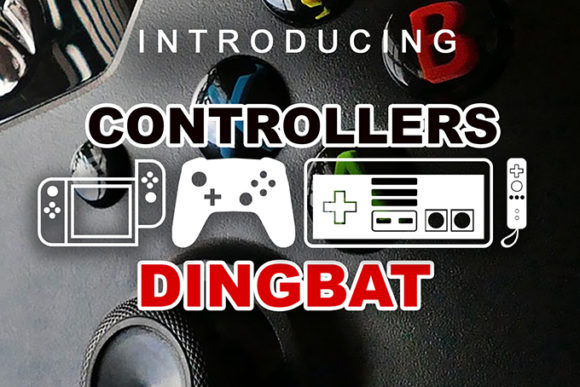
Finding a unique graphic element that perfectly captures the essence of gaming culture can be a challenge for any designer. Whether you are crafting a logo for a new Twitch streamer, designing merchandise for a retro gaming convention, or building a UI for a gaming review site, you need icons that are crisp, scalable, and stylistically consistent. This is where the Controllers font enters the game. It is an awesome dingbats font containing various gaming consoles, controllers, and video game icons, transforming standard keystrokes into detailed vector graphics.
What Makes Controllers a Valuable Design Asset?
Unlike standard image files or clipart, a dingbats typeface like Controllers offers incredible flexibility. Because the icons are rendered as font characters, they function just like text. You can easily change the color, adjust the size without losing resolution, and overlay them on backgrounds with ease. This makes it a premium design asset for projects requiring high-quality scalability. It fits perfectly into a modern typography toolkit, sitting alongside your favorite sans serif font or serif font to provide specialized visual accents.
The visual appeal of this typeface lies in its ability to communicate instantly. Instead of searching for stock images of a generic joystick or a specific handheld console, you can simply type the corresponding letter to insert a clean, stylized icon. This is particularly useful for creating cohesive brand identity elements where specific hardware aesthetics are required.
Creative Use Cases for Gaming Typography
The versatility of the Controllers font makes it suitable for a wide range of creative projects. It goes beyond simple decoration; it serves as a functional tool for visual storytelling. Here are a few practical applications where this font shines:
- Logo Design and Branding: Create distinctive marks for e-sports teams, gaming cafes, or tech blogs. The icons can be combined with a bold display font to create a strong visual hierarchy.
- Social Media Graphics: Enhance your Instagram stories, YouTube thumbnails, or Twitter headers with recognizable controller symbols. They add immediate context to posts about new game releases or hardware reviews.
- Packaging and Merchandise: If you are designing t-shirts, mugs, or sticker packs for a gaming audience, these icons provide the perfect finishing touch. They look sharp on print-on-demand products.
- Poster Design and Editorial Layouts: Use the icons as bullet points, section dividers, or large background watermarks in magazine layouts and event posters to reinforce the gaming theme.
Tips for Selecting and Using the Font
When incorporating Controllers into your workflow, a few best practices can help you achieve a polished, professional look. First, consider the mood of your project. While the font is inherently playful, the specific style of the icons (whether they are pixel-art inspired or sleek and modern) should match the overall tone of your design.
Font pairing is also crucial. Since Controllers is a graphic-heavy typeface, it pairs best with clean, legible body text. A simple sans serif font or a minimalist serif font usually works best to ensure the icons stand out without overwhelming the viewer. Avoid pairing it with overly decorative script fonts or handwritten fonts, as this can create visual clutter.
Finally, always test for readability and licensing. Ensure the icons are recognizable at the size you intend to use them, especially for web design and mobile interfaces. Also, verify that the license covers your specific use case, whether it is for personal desktop use or a large-scale commercial font application. By selecting a well-designed typeface like Controllers, you ensure your projects look professional, relevant, and visually engaging.